Route 03 · Installation Guide for Lorn's Lure
THE PLUGIN
One DLL into one folder. The archive is already shaped like your game directory, so this is the shortest chapter of the route.
Get the archive
If you grabbed it during chapter 01, skip ahead. Otherwise, both links below serve the identical file — 93.5 KB, SHA-256 verifiable on the Downloads page:
Direct download
v1.0.2Google Drive mirror
v1.0.2On StixsworldHD’s own paid Google Drive account — personally guaranteed safe and secure, and Drive’s servers are often the faster download.
What's inside the RAR
The archive is deliberately shaped like your game folder, and it hides nothing — compiled plugin, complete source, full documentation:
UngodlyGFX_v1_0_2_LornsLure_BepInEx5_x64_by_StixsworldHD.rar
├── BepInEx\
│   └── plugins\
│       └── StixsworldHD.LornsLure.UngodlyGFX.dll   ← the plugin (the only file the game needs)
├── README.md                                        ← full manual: install, keys, every feature, changelog
└── source\                                          ← the complete C# source the DLL was built from
    ├── Plugin.cs            (entry point, all config definitions)
    ├── GfxDirector.cs       (settings enforcement engine)
    ├── PostFxApplier.cs     (PostProcessing v2 control)
    ├── ConfigMenu.cs        (the F10 menu)
    ├── StatusOverlay.cs     (the F9 overlay)
    ├── SuperSampler.cs      (render-scale system)
    ├── UngodlySharpen.cs    (the sharpening pass)
    └── Patches.cs           (Harmony hooks into the game)
Only the DLL has to reach the game. The README and source folder are yours to keep
anywhere — or to read, if you like knowing exactly what runs inside your game. Everything the
plugin does is in those eight files; there are no other dependencies beyond BepInEx itself.
Install: extract straight over the game folder
Because the RAR already contains the right BepInEx\plugins shape, the fastest
install is a single extract:
- Right-click the RAR → Extract files… (7-Zip / WinRAR) or open it and drag the
BepInExfolder out. - Point the extraction at your game folder — the one with
LornsLure.exe— and confirm. If Windows asks to merge theBepInExfolders, say yes; nothing gets overwritten, the DLL just slots intoplugins.
That’s the whole install. The result:
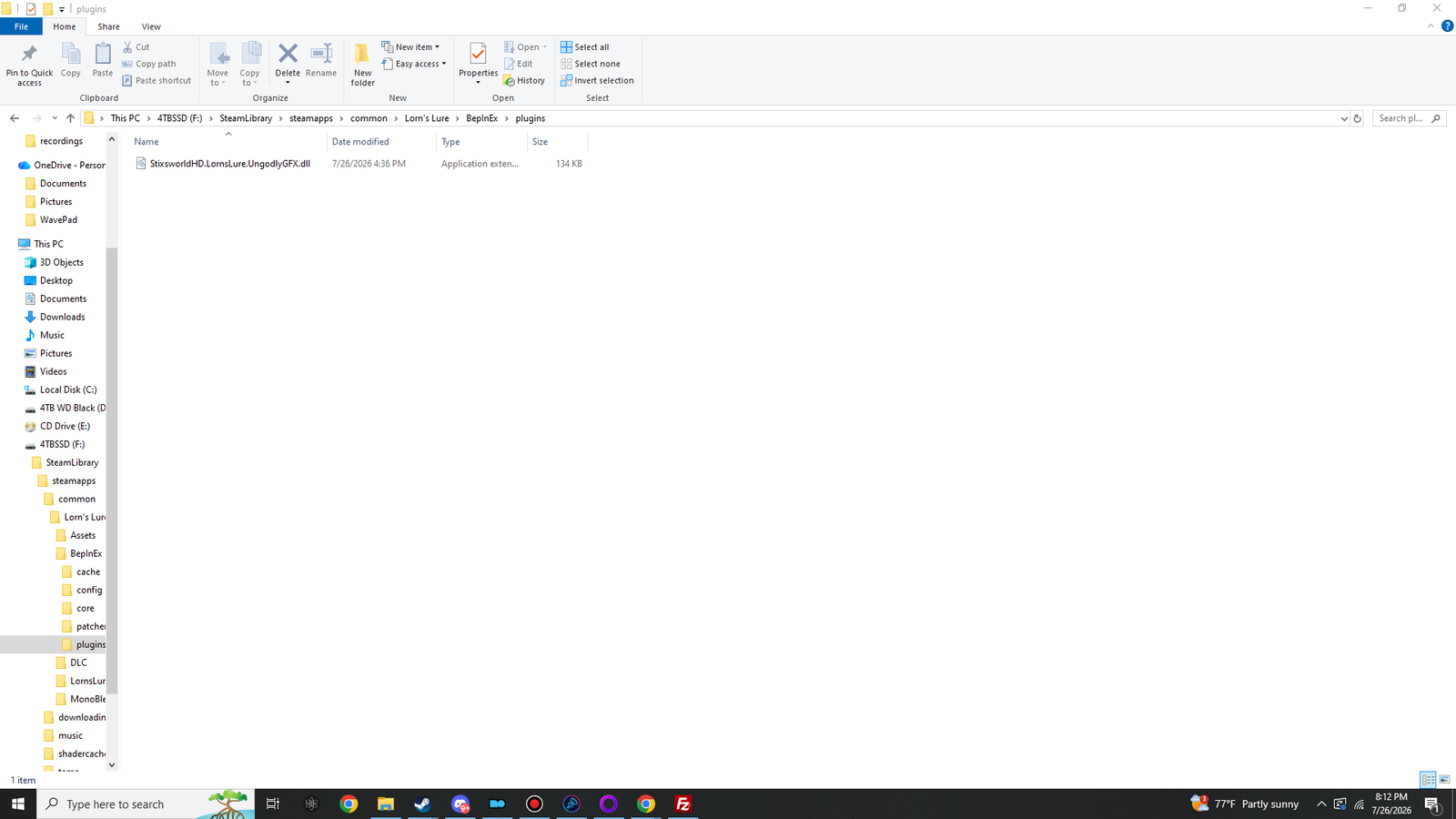
StixsworldHD.LornsLure.UngodlyGFX.dll (134 KB) sitting in BepInEx\plugins. One DLL — that’s everything the game needs.Prefer to place files by hand?
Equally valid: open the RAR, and copy just the DLL from
BepInEx\plugins\StixsworldHD.LornsLure.UngodlyGFX.dll into your game’s
Lorn's Lure\BepInEx\plugins folder.